
Quick Answer
Best for home offices and basic huddle rooms: MeetingBar A10 — 4K, 120° lens, lowest cost of entry. Best camera detail in a focus room: MeetingBar A25 — triple-eye camera with two telephoto lenses. Best for small-to-medium conference rooms: MeetingBar A40 — dual 48 MP lenses, stereo speakers, and the longest microphone reach of the three.
Yealink's MeetingBar line covers everything from a desk to a mid-size conference room with the same recipe — an Android-based all-in-one bar, natively running Microsoft Teams or Zoom. This comparison lays out where the A10, A25, and A40 actually differ, using each model's spec sheet. Browse the full lines in Teams equipment and Zoom Rooms equipment.
The Lineup at a Glance
All three share the same DNA: camera, 8-microphone array, speaker, and computing unit in one bar; native Microsoft Teams and Zoom support; BYOD Mode for use as a USB peripheral; and an electric privacy shutter.
What actually separates them: camera architecture, audio reach and speakers, operating system generation, and which touch console they pair with. Those four things decide the room fit.
Yealink MeetingBar A10: The Entry Point
MeetingBar A10 targets home offices, focus rooms, huddle rooms, and smaller conference rooms.
Camera: 4K UHD, 120° field of view · Audio: 8-microphone array, ~20-foot (6 m) pickup · OS: Android 11
The A10 keeps the essentials: Auto Framing and Speaker Tracking for a natural shot, Wi-Fi and Bluetooth, HDMI out to the display, and a TV clamp for a quick install. It is certified for both Microsoft Teams and Zoom Rooms, so one SKU covers a mixed fleet.
Two ways to buy it: the bare A10-010, or the A10-020, which adds the CTP18 touch console for walk-up control at the table — the configuration most meeting rooms want. Add the optional WPP30 presentation pod and the A10 supports wireless BYOD.
Yealink MeetingBar A25: The Camera Specialist
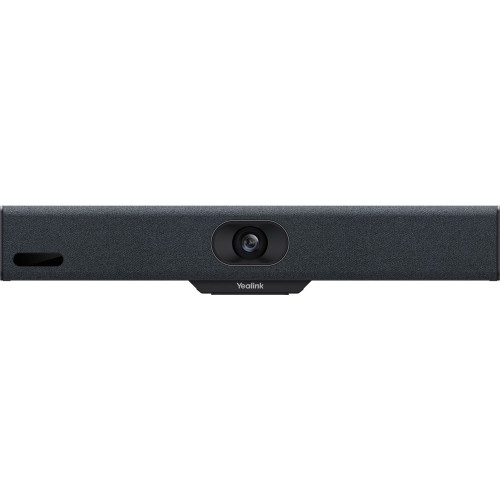
MeetingBar A25 (A25-031 bundle) is built for focus and huddle rooms where video quality is the point.
Camera: triple-eye — one 151° ultra-wide + two telephoto lenses · Audio: 8 mics, 16-foot reach, AI Noise Cancellation, 10W speaker · Console: CTP25 10.1″ touch display
The telephoto pair is the differentiator: the A25 can pick out individual faces with natural detail instead of cropping a single wide feed, and features like IntelliFocus and Video Fence ride on that hardware. It supports up to 4K video and 4K content, runs Teams Rooms and Zoom Rooms natively, and adds General Mode and BYOD Mode. It's also Microsoft MDEP compatible.
The bundled CTP25 connects directly to the bar, and its USB-C link to a laptop carries content sharing and BYOD duty. If your huddle rooms host client-facing calls, this is the bar that makes the far end notice.
Shop the Yealink A25 + CTP25 bundle →
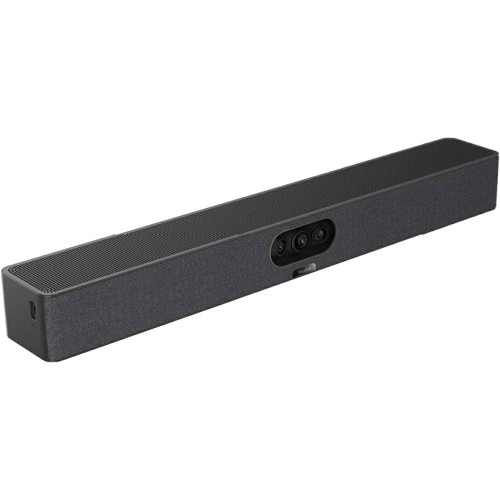
Yealink MeetingBar A40: The Room-Size Champion
MeetingBar A40 (A40-031 bundle) stretches the all-in-one format to small and medium rooms.
Camera: dual 48 MP lenses combined into one 120° 4K feed · Audio: 8-microphone array with nearly 20-foot reach, stereo speakers · OS: Android 13
The A40 merges two 48 MP feeds into a single high-pixel-density image, which keeps faces sharp at ranges where a huddle bar goes soft. Stereo speakers and the longest mic reach in the line handle the bigger table, and AI noise cancellation and reverberation suppression clean up the audio.
Installation is the quiet win: one Cat5e cable carries power and network between bar and CTP25 console, and one USB-C cable to a laptop enables 4K content sharing, BYOD Mode, and PD charging. Native Teams and Zoom, General Mode, and BYOD Mode are all on the sheet. A remote-control variant (A40-010 with VCR11) exists for rooms that don't need a console.
Shop the Yealink A40 + CTP25 bundle →
What All Three Share
The management stack is common. Yealink's MeetingBars enroll in the platforms IT already uses — the A40's sheet lists Microsoft Teams Admin Center, the MTR Portal Management Platform, Zoom Device Management, and Yealink Management Cloud Service. A mixed A10/A25/A40 fleet manages like one product line.
Privacy and presence hardware is standard. Electric privacy shutters close the lens outside meetings across the line, and the bars pair Wi-Fi and Bluetooth for wireless device connectivity alongside their wired HDMI display outputs.
Mounting accessories cover the odd rooms. The bars ship with display mounting hardware, and add-ons handle the exceptions — the VB-TABLETOPMOUNT-01 table stand puts an A40 on a credenza or desk where wall mounting isn't an option.
Every model has a BYOD escape hatch. Whatever platform the room runs natively, each bar can drop into BYOD Mode as a USB peripheral. Buying into the MeetingBar line doesn't lock the room to one meeting service — useful insurance when a merger or a big customer changes the platform mix overnight.
Content sharing rides the console on the newer models. On the A25 and A40 bundles, the CTP25's USB-C laptop connection carries content into the meeting at up to 4K, and the same link charges the laptop via PD — one connector doing three jobs at the table.
Every Pick, Side by Side
| MeetingBar A10 | MeetingBar A25 | MeetingBar A40 | |
|---|---|---|---|
| Camera | 4K, 120° FOV | Triple-eye: 151° ultra-wide + 2 telephoto | Dual 48 MP, combined 120° 4K |
| Mic reach | ~20 ft (6 m) | 16 ft | Nearly 20 ft |
| Speaker | Integrated speaker | 10W speaker | Stereo speakers |
| Console | CTP18 (A10-020) | CTP25 10.1″ | CTP25 10.1″ (A40-031) |
| Platforms | Teams, Zoom Rooms, BYOD | Teams, Zoom Rooms, General, BYOD | Teams, Zoom, General, BYOD |
| Room fit | Home office, huddle | Focus / huddle, video-critical | Small to medium |
Decision shortcut: Four seats or fewer and budget-first → A10-020. Same room but the far-end picture matters → A25 bundle. Six to twelve seats → A40 bundle. Bigger than that, leave the MeetingBar line for a Windows kit.
FAQ
Do all three work with both Teams and Zoom?
Yes — each model's spec sheet lists native Microsoft Teams and Zoom support, and all three add BYOD Mode as a USB peripheral for other platforms. The A25 and A40 also list a wired General Mode.
What is the difference between the CTP18 and CTP25 consoles?
The CTP18 is the 8″ console bundled with the A10-020. The CTP25 is a 10.1″ Android 13 console that connects to the bar directly or over IP, and adds USB-C content sharing, BYOD support, and PD charging for a connected laptop.
Can I use a MeetingBar without any console?
Yes. The A10-010 ships bar-only, and the A40-010 bundle pairs the bar with a VCR11 remote instead of a console. Consoles earn their cost in shared rooms where walk-up control matters.
Which one for a 15-person boardroom?
None of these — that is PTZ-camera, multi-microphone territory. See the room-size catalog for medium and large room systems.
Do the bars work without a network drop at the display?
The bars support Wi-Fi, and the A10 can take power over PoE or an adapter — but for a shared meeting room, wired network remains the reliable default. Treat Wi-Fi as the fallback, not the plan.
Is there a Zoom-specific version to order?
No separate SKU needed for these three — the same hardware runs Teams or Zoom natively, chosen at setup. Browse the Zoom Rooms equipment category to see each bar's Zoom listing alongside dedicated Zoom bundles.
Updated August 2026